Manufacturer image · not our photo
QUESTIONS, ANSWERED · key organizer
How to Charge KeySmart Card and Other KeySmart FAQs
Answers to common KeySmart questions: how to charge a KeySmart card, what KeySmart is, how many keys it holds, how to use it, and where to buy.
We earn a commission if you buy through this link. It does not change the price you pay. Check the seller for current price, compatibility, and return conditions.
How do you charge a KeySmart card?
If you came here searching for how to charge a KeySmart card, here's the short answer: you don't. The KeySmart sold on this offer page has no battery, no electronics, and nothing to charge. It's a passive aluminum frame built to hold keys.
The charging question comes up because the KeySmart brand also makes tracker products — the SmartCard and the KeySmart Pro with Tile. Those do have batteries and charging needs. They are separate products, and they are not part of this offer.
We don't have charging instructions for those items, and we won't guess at steps. If you own a SmartCard or a Pro, the manual it shipped with or the maker's support page is the right place for exact instructions.
The reason this answer matters: don't order the standard KeySmart expecting a cable in the box. There isn't one, because there's nothing to plug in.
What is KeySmart?
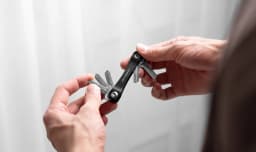
What is KeySmart, exactly? It's a compact key organizer. Your keys stack between two aluminum plates — the offer page calls them aircraft-grade — and each key folds out one at a time when you need it.
The maker positions it as a replacement for the bulky, jingling keychain. Instead of keys hanging loose on a ring, they sit flat and stacked inside the frame.
Per the offer page, it comes with stainless steel hardware and a loop ring for a car fob. The maker says the whole thing weighs less than half an ounce.
In one line: it's a slim metal case for your keys.
How many keys does KeySmart hold?
The maker says the standard frame organizes up to 8 keys.
How many keys does KeySmart hold in practice? That depends on the keys themselves. The offer page says it works with everything from small mailbox keys to chunky electronic fobs. Fobs don't go between the plates, though — they attach to the loop ring.
If 8 keys isn't enough, KeySmart sells expansion packs that hold more. Those are separate products and not covered by this offer, so check with the maker if you need extra capacity.
How do you use KeySmart?
How to use KeySmart, in plain steps:
- Add keys one at a time between the aluminum plates, in the order you want them.
- Tighten the stainless steel posts until the keys are locked in but still swing out smoothly.
- Attach your car fob to the loop ring.
- Swivel out the key you need, use it, and fold it back in.
The maker suggests ordering keys smallest to largest, or by how often you use them. Either way works — it's your call.
Tension is the main thing to get right. Too loose and the keys wobble. Too tight and they're hard to flip. Small adjustments to the posts fix either problem.
How long does setup take?
The maker says setup takes under 2 minutes and needs no tools. You loosen the posts, stack your keys, and tighten everything back down.
One general tip — this one is ours, not the maker's: after a day or two of use, check the posts. If any keys feel loose, re-tighten them. New assemblies sometimes settle.
Adding or removing a key later follows the same process. Loosen the posts, make the change, tighten them back.
Does KeySmart really stop keys from jingling?
The maker describes it as silent, because keys sit stacked flat inside the case instead of hanging loose. That's the design logic, and it's reasonable — flat keys under light tension have less room to rattle than keys swinging on a ring.
One caveat: anything on the loop ring sits outside the frame. A car fob or spare ring can still make some noise. The offer page doesn't address this.
We haven't tested the product, so treat the silence claim as the maker's. The stacked design should cut most key noise, but we can't confirm how quiet it is in your pocket.
Is KeySmart worth it?
Is KeySmart worth it? That depends on what you carry.
It's a reasonable buy if:
- You carry 2 to 8 keys.
- You want them flat, quiet, and in a fixed order.
- You're tired of a pocket full of jingling metal.
It's probably the wrong buy if you want a built-in tracker, a USB drive, or a multitool. Those features exist, but as add-ons or other KeySmart models — not this organizer.
On returns: the maker offers a 30-day money-back guarantee and a 2-year warranty for manufacturing defects. The offer text doesn't state return shipping terms, so check before ordering if that matters to you. A return window is not the same as a free return — the cost of shipping it back is an unknown.
How do I reset a KeySmart Tile?
The question "how do I reset my KeySmart Tile" is about the KeySmart Pro with Tile — a different product from the organizer on this offer page.
The standard KeySmart has no electronics. There is nothing to reset, pair, sync, or charge.
If you own the Pro and need to reset its Tile, we can't give you exact steps. None appear in the offer text, and inventing them would risk steering you wrong. The maker's support documentation for the Pro is the right place to look.
Where can you buy KeySmart?
Where to buy KeySmart: this offer is sold direct by the maker through a GiddyUp offer page.
The price is shown on the offer page and can change, so check there for the current figure rather than trusting numbers quoted elsewhere.
Buying direct also matters for coverage. The 30-day money-back guarantee and 2-year warranty described in the offer text apply to purchases through that page. If you spot KeySmart on another site or in a store, the terms may differ — confirm with that seller before you buy.
Sources and research scope
Seller-information assessment, not a hands-on test. Facts come from the seller offer page as fetched on the source-check date; no independent testing was done.
- KeySmart seller information · checked
Before ordering, record the exact model, what is included, and the delivered price with shipping, any subscription or replacement costs, and return postage. Read the return conditions for opened or used items and the deadline. A return window is not a guarantee of results or a cost-free trial, and a sale percentage is not evidence of value.